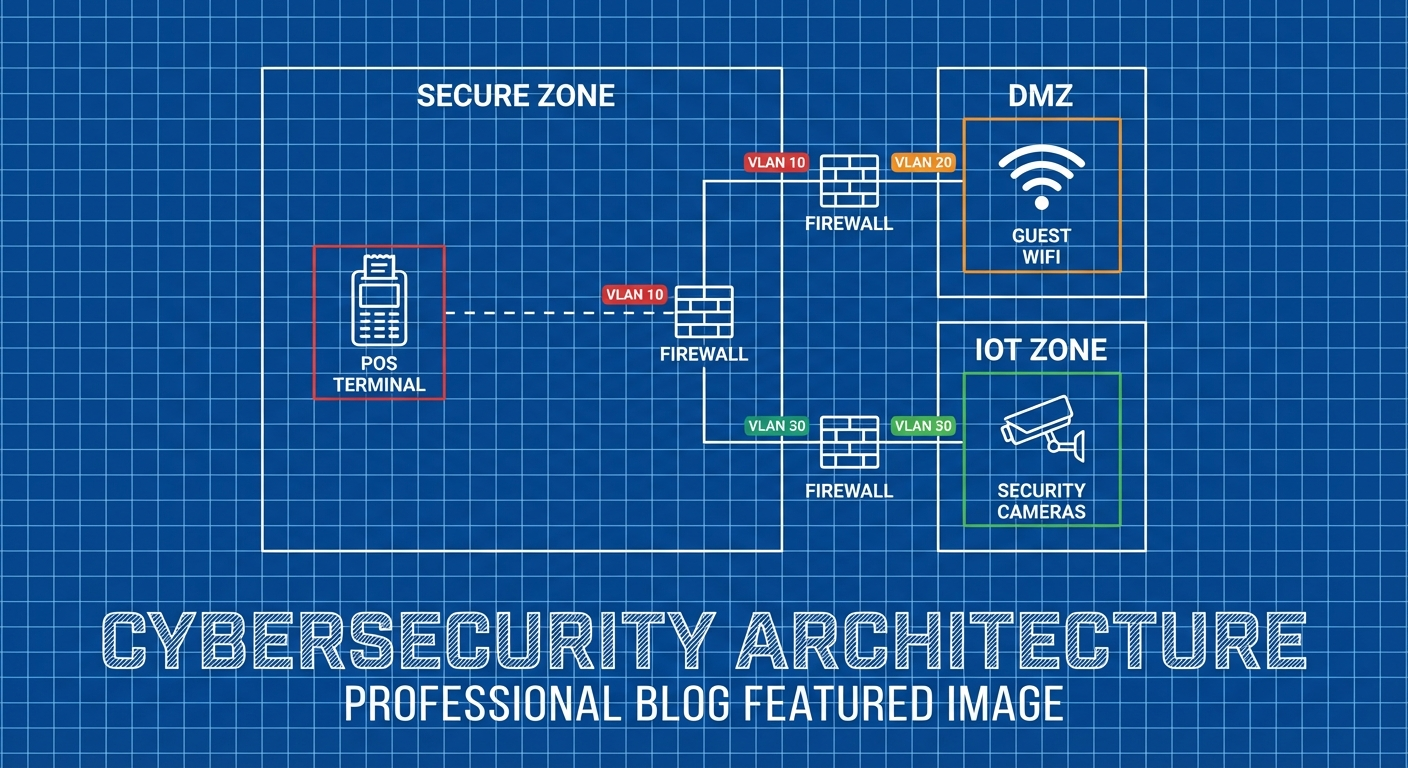
Your point-of-sale, METRC compliance systems, and customer WiFi should never share the same network. Here’s how to architect secure network separation for cannabis operations.
Why Network Segmentation Matters
The STIIIZY breach didn’t happen because of weak passwords or missing antivirus. It happened because an attacker who compromised a POS vendor had access to everything—customer data, payment systems, and the network pathways connecting them.
Network segmentation could have limited that damage. Instead of one breach exposing everything, segmentation creates boundaries. An attacker who compromises your guest WiFi can’t pivot to your POS. Malware on a budtender workstation can’t reach your compliance systems.
Think of it like compartments on a ship. A leak in one compartment doesn’t sink the whole vessel.
 Canna SecureCannaSecure
What’s at Stake
In a flat (non-segmented) cannabis network, one compromise can expose:
- POS systems and payment data
- Customer database (IDs, medical info, purchase history)
- METRC credentials and compliance data
- Security cameras and access control
- Employee information
- Financial systems
- Everything else on your network
With proper segmentation, each of these systems is isolated. Attackers have to work much harder to move between segments, and you have more opportunities to detect them.
The Segmentation Framework
A properly segmented cannabis network should have distinct zones for different security requirements.
Zone Architecture
                         ┌─────────────────────────────────────────┐
                         │              INTERNET                   │
                         └──────────────────┬──────────────────────┘
                                            │
                                      ┌─────▼─────┐
                                      │  Firewall │
                                      └─────┬─────┘
                                            │
            ┌───────────────────────────────┼───────────────────────────────┐
            │                               │                               │
     ┌──────▼──────┐               ┌────────▼────────┐              ┌──────▼──────┐
     │    DMZ      │               │    INTERNAL     │              │   GUEST     │
     │   Zone      │               │    NETWORK      │              │   WIFI      │
     └─────────────┘               └────────┬────────┘              └─────────────┘
                                            │
            ┌───────────────────────────────┼───────────────────────────────┐
            │                               │                               │
     ┌──────▼──────┐               ┌────────▼────────┐              ┌──────▼──────┐
     │    POS      │               │   COMPLIANCE    │              │  CORPORATE  │
     │   SEGMENT   │               │    SEGMENT      │              │   SEGMENT   │
     └─────────────┘               └─────────────────┘              └─────────────┘
Segment Definitions
DMZ (Demilitarized Zone) Internet-facing systems that must be accessible from outside:
- E-commerce web servers
- VPN concentrators
- Email gateways
- Public-facing APIs
Guest WiFi Completely isolated network for customers:
- No access to internal systems
- Internet access only
- Bandwidth limited
- Cannot see other devices on the segment
POS Segment Isolated network for point-of-sale operations:
- POS terminals
- Payment processing devices
- Receipt printers
- Barcode/ID scanners
Compliance Segment Systems handling regulatory data:
- METRC workstations
- Seed-to-sale tracking
- Compliance reporting systems
- Audit documentation
Corporate Segment General business operations:
- Employee workstations
- Productivity applications
- General file storage
Security Segment (Not shown—often on separate physical network)
- Security cameras (NVR/DVR)
- Access control systems
- Alarm systems
- Intrusion detection
Implementing Segmentation
Option 1: VLAN Segmentation
VLANs (Virtual Local Area Networks) are the most common approach for small to medium operations. They use existing network equipment to create logical separation.
Metrc & BioTrack Security Configuration GuideThe Complete Security Hardening Manual for Cannabis Seed-to-Sale Tracking Systems Your compliance tracking system is a direct line to state regulators—and a prime target for attackers. This guide shows you exactly how to lock it down. WHY THIS GUIDE MATTERS Your seed-to-sale tracking system isn’t just compliance software. It’s Canna SecureCannaSecure
Typical VLAN Layout:
VLAN ID Name Subnet Purpose
1 Native 192.168.1.0/24 Management (restricted)
10 Corporate 192.168.10.0/24 Employee workstations
20 POS 192.168.20.0/24 Point-of-sale systems
30 Compliance 192.168.30.0/24 METRC/regulatory systems
40 Security 192.168.40.0/24 Cameras, access control
50 Guest 192.168.50.0/24 Customer WiFi
100 Management 192.168.100.0/24 Network equipment
Requirements:
- Managed switches (VLANs aren’t available on basic switches)
- Router or firewall capable of inter-VLAN routing
- Access points that support multiple SSIDs on different VLANs
Recommended Equipment:
Budget-Conscious:
- Ubiquiti UniFi switches and access points
- pfSense or OPNsense firewall (open source, runs on commodity hardware)
- ~$500-2,000 for small dispensary
Mid-Range:
- Cisco Meraki (cloud managed)
- Fortinet FortiGate firewall
- ~$2,000-10,000 for small-medium operation
Enterprise:
- Cisco Catalyst switches
- Palo Alto Networks firewall
- ~$10,000+ for larger operations
Option 2: Physical Segmentation
For highest security requirements, run completely separate physical networks.
When Physical Separation Makes Sense:
- Security cameras (often required by regulation)
- Extremely sensitive systems
- Compliance requirements mandating air gaps
- When VLAN security isn’t trusted
Example:
Network 1: Corporate/Guest (standard business)
Network 2: POS (payment processing)
Network 3: Security (cameras, access control)
Physical separation is more expensive (separate equipment, cabling) but provides stronger isolation. Many cannabis operations use a hybrid: VLANs for most segmentation, physical separation for cameras.
Option 3: Zero Trust Network
The most sophisticated approach treats every connection as potentially hostile, regardless of network location.
Zero Trust Principles:
- Verify explicitly (authenticate and authorize every access)
- Use least privilege access
- Assume breach (design as if attackers are already inside)
Implementation:
- Every device authenticates to the network
- Access is granted per-application, not per-network
- Micro-segmentation down to individual workloads
- Continuous verification, not just at login
Reality Check: Full zero trust is overkill for most cannabis operations. It requires significant investment and expertise. However, incorporating zero trust principles (MFA everywhere, least privilege, assume breach) strengthens any architecture.
Segment-by-Segment Configuration
POS Network Segment
Your POS systems are the crown jewels. Isolate them accordingly.
What Goes Here:
- POS terminals
- Card readers/payment devices
- Cash drawers (if networked)
- Receipt printers
- Customer-facing displays
- ID scanners
- POS server (if on-premise)
Security Requirements:
Inbound Traffic (to POS segment):
- Block all traffic from Guest network
- Block all traffic from general Corporate network
- Allow only specific management traffic (for updates, support)
- Allow return traffic from internet (for cloud POS)
Outbound Traffic (from POS segment):
- Allow traffic to POS provider (specific IPs/domains)
- Allow traffic to payment processor (specific IPs/domains)
- Allow traffic to METRC integration (if applicable)
- Block all other outbound traffic
Inter-segment:
- POS to Compliance: Allow only necessary integration traffic
- POS to Corporate: Block (or very limited access for reports)
- POS to Security: Block
- POS to Guest: Block absolutely
Firewall Rules (Example):
# POS Segment Rules (VLAN 20)

# Allow POS to cloud provider
allow 192.168.20.0/24 → pos-provider.com:443
allow 192.168.20.0/24 → payment-processor.com:443

# Allow POS to METRC integration
allow 192.168.20.0/24 → 192.168.30.10:8443 (METRC server)

# Allow management access from IT workstation
allow 192.168.10.50 → 192.168.20.0/24:22,443 (IT admin only)

# Block everything else
deny 192.168.20.0/24 → any
deny any → 192.168.20.0/24
Additional POS Hardening:
- Disable USB ports (prevent data exfiltration)
- Enable application whitelisting (only approved software runs)
- Log all transactions and access
- Segment even within POS if possible (terminals separate from server)
Compliance/METRC Segment
METRC access is highly sensitive—it’s your regulatory audit trail.
What Goes Here:
- Dedicated METRC workstations
- Inventory management systems
- Compliance reporting tools
- Integration servers
Security Requirements:
Inbound Traffic:
- Allow from POS segment (specific integration traffic only)
- Allow from IT management (limited)
- Block all other inbound
Outbound Traffic:
- Allow to METRC (api.metrc.com or your state’s endpoint)
- Allow to state regulatory systems
- Block all social media, personal email, and unnecessary sites
Access Control:
- Only compliance staff should have credentials for this segment
- MFA required for all access
- Session logging enabled
Firewall Rules (Example):
# Compliance Segment Rules (VLAN 30)

# Allow to METRC
allow 192.168.30.0/24 → api.metrc.com:443

# Allow POS integration (specific flow)
allow 192.168.20.10 → 192.168.30.10:8443

# Allow management
allow 192.168.10.50 → 192.168.30.0/24:22,3389

# Block everything else
deny 192.168.30.0/24 → any
deny any → 192.168.30.0/24
Additional Compliance Hardening:
- Dedicated machines (no web browsing, email on METRC systems)
- Full logging of all METRC transactions
- Regular access audits
- Screenshot/video recording of sessions (some states require this)
Guest WiFi Segment
Your customer WiFi should be completely isolated from business operations.
What Goes Here:
- Customer devices only
- Nothing else
Security Requirements:
Absolutely No Access To:
- POS network
- Compliance network
- Corporate network
- Security cameras
- Anything internal
Allowed:
- Internet access (filtered)
- That’s it
Implementation:
Separate SSID:
SSID: "Dispensary-Guest"
Security: WPA2/WPA3 (yes, use encryption even for guest)
VLAN: 50 (Guest)
Firewall Rules:
# Guest Segment Rules (VLAN 50)

# Allow internet access
allow 192.168.50.0/24 → internet:80,443

# Block RFC1918 (all private networks)
deny 192.168.50.0/24 → 10.0.0.0/8
deny 192.168.50.0/24 → 172.16.0.0/12
deny 192.168.50.0/24 → 192.168.0.0/16

# Block known bad categories (content filter)
deny 192.168.50.0/24 → [malware, adult, etc.]
Client Isolation: Enable “client isolation” or “AP isolation” on your access points. This prevents devices on the guest network from seeing each other—important to stop lateral attacks.
Bandwidth Limiting: Set per-client bandwidth limits (e.g., 10 Mbps down, 5 Mbps up). This prevents one user from saturating your connection and also limits data exfiltration speed if a malicious device connects.
Captive Portal (Optional): Consider a simple captive portal requiring acceptance of terms before access. This provides legal protection and a minor deterrent for malicious use.
Security Camera Segment
Cameras are often overlooked in security—ironically, they’re frequently insecure themselves.
The Camera Problem:
- Many IP cameras have known vulnerabilities
- Firmware updates are inconsistent
- Default passwords are common
- Cameras may “phone home” to overseas servers
What Goes Here:
- All IP cameras
- NVR (Network Video Recorder) or DVR
- Access control panels
- Alarm systems (if IP-based)
Best Practice: Physical Separation
For cameras, consider a physically separate network:
- Dedicated switch(es) for cameras
- No connection to business network
- Cameras can’t reach the internet
- Access NVR from a dedicated viewing terminal or via VPN
If Using VLANs:
# Security Camera Segment Rules (VLAN 40)

# Block internet access (cameras don't need it)
deny 192.168.40.0/24 → internet

# Allow viewing from security terminal
allow 192.168.10.100 → 192.168.40.5:8080 (NVR web interface)

# Block everything else
deny 192.168.40.0/24 → any
deny any → 192.168.40.0/24
Additional Camera Hardening:
- Change all default passwords (yes, this still needs to be said)
- Disable UPnP on cameras
- Update firmware regularly
- Disable cloud features if not needed
- Consider cameras from reputable vendors (avoid ultra-cheap imports)
Corporate Segment
Your general business network needs protection too, but requires more flexibility.
What Goes Here:
- Employee workstations
- Printers
- File servers
- Business applications
Security Requirements:
Reasonable Access:
- Internet access (with content filtering)
- Cloud applications (Microsoft 365, Google Workspace, etc.)
- Printers and file shares
Restricted:
- Cannot initiate connections to POS segment
- Cannot access METRC systems (unless authorized)
- Cannot access camera network
Outbound Filtering:
- Block known malicious categories
- Log all traffic for investigation
- Consider blocking personal email/webmail (data exfiltration vector)
Firewall Rules:
# Corporate Segment Rules (VLAN 10)

# Allow standard internet access
allow 192.168.10.0/24 → internet:80,443,53

# Allow to printer
allow 192.168.10.0/24 → 192.168.10.200:9100,631

# Allow specific users to compliance (compliance staff only)
allow 192.168.10.25 → 192.168.30.0/24:3389
allow 192.168.10.26 → 192.168.30.0/24:3389

# Block to POS
deny 192.168.10.0/24 → 192.168.20.0/24

# Block to cameras
deny 192.168.10.0/24 → 192.168.40.0/24
Putting It All Together
Sample Small Dispensary Setup
Equipment:
- 1x Ubiquiti EdgeRouter (firewall/router)
- 1x Ubiquiti UniFi 24-port switch (managed, PoE)
- 2x Ubiquiti UniFi access points
- 1x Dedicated camera switch (unmanaged, separate)
Network Layout:
Internet → EdgeRouter → UniFi Switch → All VLANs
                ↓
         Camera Switch → Cameras (physically isolated)
VLANs:
- VLAN 10: Corporate (192.168.10.0/24)
- VLAN 20: POS (192.168.20.0/24)
- VLAN 30: Compliance (192.168.30.0/24)
- VLAN 50: Guest WiFi (192.168.50.0/24)
WiFi SSIDs:
- “DispensaryOps” → VLAN 10 (WPA3-Enterprise, employee devices)
- “DispensaryGuest” → VLAN 50 (WPA3-Personal, customer access)
Approximate Cost: $1,500-2,500
Sample Multi-Location Operation
Per-Location:
- Same setup as above, but with site-to-site VPN to headquarters
Headquarters:
- Higher-capacity firewall (Fortinet, Palo Alto)
- Centralized management (UniFi Network Controller)
- METRC server (if hosting integration locally)
- Central logging (SIEM)
Site-to-Site VPN:
- Each location connects to HQ via IPsec VPN
- Only necessary traffic traverses VPN
- Each location maintains local internet breakout for guest WiFi
Approximate Cost: $5,000-15,000 per location + HQ infrastructure
Monitoring and Maintenance
Segmentation is only effective if you maintain it.
Ongoing Monitoring
Traffic Analysis:
- Monitor traffic between segments (there shouldn’t be much)
- Alert on unexpected cross-segment traffic
- Review firewall logs weekly
Anomaly Detection:
- Establish baseline traffic patterns
- Alert when patterns change
- Investigate unexpected connections
Segment Integrity:
- Regularly verify segments can’t communicate when they shouldn’t
- Test from each segment: “Can I reach X?” (should fail)
- Annual penetration test should include segmentation testing
Common Segmentation Failures
Watch for:
🚩 “Temporary” exceptions that become permanent “We need POS to talk to corporate for this one report” → never removed
🚩 Printer/scanner exceptions Multifunction devices often bridge networks—be careful with placement
🚩 Vendor remote access “Give me a way in” often bypasses segmentation—use jump hosts
🚩 WiFi misconfigurations Wrong VLAN tagged on access point port = segment breach
🚩 Shadow IT Employees plugging in personal routers or switches
Regular Reviews
Monthly:
- Review firewall rule changes
- Check for unauthorized devices on segments
- Verify VLAN assignments on switch ports
Quarterly:
- Full firewall rule audit
- Verify segmentation effectiveness (test cross-segment access)
- Review vendor access
Annually:
- Penetration test including segmentation testing
- Architecture review—does segmentation still match business needs?
- Documentation update
Compliance Considerations
State Requirements
Many state cannabis regulations reference security without specifying segmentation. However, they do require:
California (DCC):
- Separate alarm systems from other networks (implied physical separation)
- Video surveillance system requirements (dedicated systems implied)
- Protection of track-and-trace data
Colorado (MED):
- Separation of monitoring equipment
- Protection of point-of-sale systems
- Data security requirements for customer information
General Pattern: Regulators want to see that you’ve thought about security and implemented reasonable controls. Segmentation demonstrates security maturity.
PCI-DSS Compliance
If you accept card payments, PCI-DSS applies. Segmentation is strongly encouraged (and can reduce your compliance scope).
Key PCI Requirements:
- Isolate cardholder data environment (CDE) from other networks
- Firewall between CDE and untrusted networks
- Document all connections to/from CDE
- Regular testing of segmentation controls
Segmentation Benefit: With proper segmentation, only your POS segment is “in scope” for PCI. Your corporate workstations, compliance systems, and guest WiFi are out of scope—dramatically reducing compliance burden.
HIPAA (Medical Dispensaries)
If you’re a medical dispensary handling Protected Health Information (PHI):
- PHI must be isolated from unauthorized access
- Network segmentation is an “addressable” implementation specification
- You must document how you protect PHI in transit
Segmentation supports HIPAA compliance by ensuring PHI is only accessible from authorized systems.
Troubleshooting Segmentation Issues
”Nothing Works After Segmentation”
Common Causes:
- Default deny rules blocking needed traffic
- DNS not accessible from new segments
- DHCP scope not configured for new VLANs
- Switch ports on wrong VLAN
Diagnostic Steps:
- Verify IP address is in correct range for segment
- Verify gateway is reachable (ping gateway IP)
- Verify DNS is reachable (ping DNS server)
- Check firewall logs for denied traffic
- Verify switch port VLAN assignment
”POS Can’t Connect to Cloud”
Common Causes:
- Outbound firewall rules too restrictive
- DNS queries blocked
- HTTPS inspection breaking SSL
Solutions:
- Add explicit allow rules for POS provider domains/IPs
- Ensure DNS (UDP 53) is allowed
- Bypass HTTPS inspection for POS traffic (or use provider-supplied certificates)
“METRC Integration Failing”
Common Causes:
- POS-to-Compliance segment traffic blocked
- Wrong IP addresses in firewall rules
- Integration service on wrong segment
Solutions:
- Document exact traffic flow (source → destination → port)
- Add specific allow rules for integration traffic
- Verify integration server is on Compliance segment
”Guest WiFi Users Complaining”
Common Causes:
- Bandwidth too restrictive
- Captive portal issues
- Content filter blocking legitimate sites
Solutions:
- Increase per-client bandwidth limit
- Simplify or remove captive portal
- Review content filter blocks and adjust categories
The Bottom Line
Network segmentation isn’t optional for cannabis businesses—it’s essential. Your POS, compliance systems, cameras, and guest WiFi have completely different security requirements. Mixing them on a flat network is asking for trouble.
Start with the basics:
- Separate Guest WiFi from everything (this week)
- Isolate POS systems (this month)
- Segment compliance/METRC access (next month)
- Implement physical separation for cameras (as budget allows)
- Document everything and test regularly (ongoing)
The STIIIZY breach showed what happens when everything is connected. Don’t let one compromise take down your entire operation.
Segment your network. Contain the blast radius. Sleep better at night.
CannaSecure provides network security assessments and segmentation design for cannabis operations. Contact us for architecture reviews and implementation guidance.